
Saturday, July 23, 2011


Tuesday, July 19, 2011
Good Comparison between Adobe Premiere Pro and Adobe Premiere Elements
Monday, April 25, 2011
Video Editing Post Production House Quiz that will humble
It was difficult and humbling. No I'm not going to tell you my score. If you are brave, you can also take a Broadcast Quiz and one about 20th Century movies. Broadcast and Movie Quizzes
Here is what the company does: "EditHouse is a technology services company specializing in the broadcast and communications sector. We are based in Sydney, Australia". Thanks guys!
Sunday, April 03, 2011
This girl is so funny! Dancing Sundrop Commercial
Elton John & Leon Russell on SNL - Leon and Mary Russell Wedding Album
I bought the Leon and Mary Russell Wedding Album right after the show because it was the finest album of the 1970s. Magical harmonies, romantic and breathless love songs, beautiful writing, full and rich orchestration. There isn't a bad song on the album. There is a fascinating story on CBS Sunday Morning about Elton bringing Leon back to performing and I am so glad he did. All the songs on the Wedding Album are great but Fantasy, Love's Supposed to Be That Way, and Like a Dream Come True are spectacular. Rainbow in your Eyes will have you out of your chair and boogiein' through the whole song - you won't be able to sit still!
Friday, April 01, 2011
Refurbished MiniDV Camcorders
Best MiniDV Videotape - Maxell
Sunday, March 27, 2011
NPR Fresh Air interview with Big Love Creators Mark Olsen and Will Scheffer

HDW-F900R CineAlta 24P HDCAM Package


Red Camera Steadicam

I love Corel Paintshop Pro!
New Corel PaintShop Photo Pro X3 Ultimate.Only $99.99 and packed with over $400 in free upgrades

Best Home Video Editing Software - Adobe Elements

Tuesday, March 22, 2011
Canon XL - The BEST Professional Camcorder for the Independent Producer

Monday, March 21, 2011
Panasonic HD Camcorder has a beautiful picture

Monday, March 14, 2011
Best MP3 player under $100
Friday, March 11, 2011
Mac Pro Turnkey Video Editing System with Final Cut Studio
Saturday, March 05, 2011
Best Tripod for small camcorders
1). expensive
2). heavy
3). too big for most camcorders
THE best camcorder tripod is the Sunpak. Wonderfully easy to use, light, portable, and easy to set up and tear down. The best part is the price - usually under $50.
Saturday, January 29, 2011
Best Video Editing Software Under $100
I have students who come to my class using Sony Vegas, Pinnacle and many other great, inexpensive programs. The one thing missing from missing from Adobe Premiere are all the effects bells and whistles that make Pinnacle a great all in one program. Pinnacle gives you full menus to make wedding, family, graduation, you name it videos and all those extra graphics are really nice. But for the serious amateur or even semi-professional, Premiere still offers a solid editing platform for large projects.
Back when I first posted this "Best Video Editing Software Under $100" I had a student using the Premiere/Photoshop combo on her laptop. She worked right along with us and our CS3 Production Suite and did everything we did in class with ease.
So - drum roll please....
The #1 best video editing software under $100 is Adobe Premiere Elements at $99:
HOWEVER - I love Adobe's combo pack with Photoshop Elements for just $119:
The #2 best video editing software under $100 is Pinnacle Studio:
And they have more bells and whistles in their MovieBox version:
#3 Best Video Editing Software - Sony Vegas - listed here with educational discounts and the full blown version:
Here's the old list to show you how consistent these companies have been over the last 2 years.
2008 Best Video Editing Software Under $100
#1 - Adobe Premiere Elements 4 - Create fun movies in as little as 15 minutes!

#2 - Award-Winning Home Video-editing software - Buy Pinnacle Studio Plus Version 12!

#3 - muvee - Instant home movies in 4 easy steps. Try it now.

#4 - Roxio Buy Easy Media Creator 10 Today and Save $20 after MIR!

Sunday, January 23, 2011
Canon Camcorder with mic input and headset jack - FINALLY!
Canon VIXIA HF R100 Flash Memory Camcorder, SD/SDHC Memory Card Slot, Eye-Fi SD Memory Card Compatible, 2.39MP HD CMOS Image Sensor, 2.7" Widescreen LCD, Genuine Canon 20x HD Video Lens, Dynamic Image Stabilization, 20x Optical Zoom, 2MP Digital Still Capture, 24p and 30p Frame Modes, Microphone and Headphone Terminals HF R100 Consumer Video Camcorders VIXIA HF R100 Flash Memory Camcorder
Canon has always offered great camcorders with microphone inputs and headset jacks but the last wave of HDD camcorders and flash memory saving options in all brands eliminated that much needed option. I am not sure why, but when I purchased camcorders for my classes 2 years ago, the only reasonably priced camcorder with a microphone input was Canon's miniDV model. Thankfully that's finally changed and the new VIXIA models all have microphone and headset terminals in all ranges of prices. You can get them on Sony and Panasonic models but you have to spend well over $500 which puts you in the semi professional camcorder market.
Why do you need a microphone and headset terminal? Because the built in microphones are fine if you are close to what you are recording, but can't capture good sound from far away. For me as a teacher, a microphone input helps students make sound meaningful and helps them make a complete video and audio piece without worrying their interview won't be loud enough. Technically, if they can record an interview from farther away and zoom in, the depth of field is much better and when they have to be almost on top of the interview subject to get good sound with the built in microphone. We are buying the Vixia HF R20 which isn't out yet, but many of the Canon's in the $300 and up range have the audio ports. Before you buy, check the camera specs for mic input/headset jack or terminal. THANK YOU CANON! Media teachers really appreciate it! The best place to see a wide variety of camcorders and options is B&H Photo.
Sunday, November 28, 2010
Best camcorder for a Christmas Gift!
B & H Photo - your best camcorder resource
Sony 8mm, Video8 and Hi8 refurbished camcorders
Refurbished 8MM, Hi8 & Video8

What you have to decide is whether to buy a refurbished camcorder and transfer all your old footage yourself OR send it to a duplicating company. If you have hours and hours and you want it all, it might be cheaper to buy a refurbished camcorder. Then get a Pinnacle Dazzle which will connect to your computer via USB. I know this link says Dazzle DVD but it will let you transfer to DVD OR just upload your footage to your computer so you can edit the footage.
Monday, August 09, 2010
Adobe CS5 is here! Use your academic discount at Academic Superstore to learn it fast!
Sunday, August 08, 2010
Web Plus X4 Serif Web Design Software
Sunday, June 22, 2008
Upload MiniDV Footage to your PC or DVD
1. When you upload footage do it in chunks, don't upload an hour's worth of footage. Computers still hate video because it takes up so much space so you will be able to manage your footage much more easily if you upload a little at a time. It will all go back together fine in Windows Movie Maker or another Video Editing software so don't worry about stopping and starting. Just make sure when you stop, you back up a little before you start recording again so you don't miss anything.
2. Don't throw away your old VHS after you have uploaded! Put it in a shoebox in a dark, dry closet but don't throw it away. You never know what is going to happen with computer storage in years to come.
3. Remember that hard drives crash. So you should edit your old footage as soon as possible, OR back it up to another external hard drive for safe keeping. (another reason not to throw away your original footage)
You can buy this Dazzle box at Amazon and then move your VHS machine close to your computer. Hook it up with the cables you use to hook your VHS to your TV.
 The Dazzle box has an SVHS plug which you should use if you have it. It's better quality.
If you have more questions that what I've addressed here, just post a question.
Tuesday, May 13, 2008
NEW! Pinnacle Studio Plus version 11
Pinnacle is one of the only video editing software companies that has an easy to use video converter for your home computer. It's called a Dazzle box and you can see the picture at the right of this screen. It hooks to your PC via USB and accepts your camera cables or your VHS video machine cables. Then you upload your VHS footage into your computer and edit it on Pinnacle's great Studio Plus software or Windows Movie Maker. Also the Dazzle box contains software that lets you burn straight to DVD which helps you transfer your older VHS or Hi 8 footage.
 Convert and copy video to portable media players, including iPod and PSP with Mobile Media Converter!
Saturday, May 03, 2008
Video below edited using..
Time for Media teacher to share what works!
Monday, April 28, 2008
Review of Windows Movie Maker Video Editing Software
For the past 2 years, I have turned countless students and adults on to the wonderful, free tool inside almost everyone's Windows based computer. Windows Movie Maker is a marvel and the majority of those I teach had no idea it was living on their hard drive. The next astonishing fact is that it's easy for almost everyone to use. I have had adults in my classes who were uncomfortable surfing the internet and googling and even they caught on quickly to WMM's ease of use. The teacher in me loves the instructions right there on the left side, called tools as they should be and completely clear...do this, do this, do this ....wah-lah you have a movie. As a broadcast professional and video editor for 30 years and someone comfortable with most video editing software, this is the best way to learn to edit video. Find some pictures and import them into collections, locate the free music in the music sample folder and begin to edit your first masterpiece. It's delightful to have students of all ages make a 30 second movie with pictures and sound and want to take it home to show everyone that they edited their very first video! That's the beauty and simplicity of Windows Movie Maker and it's exactly as it should be for a free, first experience video editing program.
I have read all of the very technical reviews on each and every version, but there is no need to take apart every little flaw in this software. I'll talk about the few drawbacks a little later but for now let's just rave about its positives. This software does what it’s supposed to, edit a simple video and output it to a CD or videotape. I think too often the reviewers are expecting too much from this free gift or expecting with later versions that it should do more and more. It shouldn’t. With more bells and whistles come more complicated instructions and functions, again defeating the purpose of this easy to use software.
Here’s what I like. It’s free. Second and actually more important is that it has many wonderful effects that are actually quite complicated even for professional editors in expensive video editing software. My students often need the wonderful old film look or the “ease in” feature so we edit our larger pieces in Adobe Premiere Pro and then import the finished piece to WMM to easily add those great effects. Premiere will do most of them and certainly Adobe After Effects will, but WMM does them effortlessly! I am especially impressed with the titles and title overlay track. To make a newspaper headline with your video inside and then fly it away to reveal new video is very complicated in professional editing software. The WMM squeeze left or right for rolling credits at the end is also brilliantly simple. One special trick I’ve learned while teaching WMM is being able to separate your video and audio and using just the audio on the music or audio track. It’s a much more versatile timeline than it first appears.
Downsides are few but I promised so here goes and there are really only two complaints. Number one is that the output instructions are too vague and complicated. When you output you need to know why you are outputting and what the quality will be and it isn’t explained very well. In the “other” section of “save this video to my computer” there are way too many choices for the inexperienced video user. It should be clearly marked that the best quality saving option is the DV/AVI. But the instructions should also warn that that file will take up a lot of hard drive space. This is a confusing issue for even professionals and it’s a new problem for video on the web, but the software authors should find a way to explain it more clearly. What ends up happening is the editor unknowingly picks a bad quality file. After working so hard on the video they get a bad outcome: a fuzzy video. That makes them blame the Windows Movie Maker software or their computer and they stop trying to edit video. Number two - none of us like the fact that you can’t move video around on the timeline (you can move audio around separately and have it stay where you put it). But when I teach it, I explain that it’s meant to be rigid so the newb editor can’t make a mistake, no matter how hard he or she tries. When you find yourself irritated about that rigidity you have learned all you can learn on WMM and it’s time to upgrade to one of the wonderful and inexpensive new softwares out on the market – Adobe Elements, Pinnacle or Sony Vegas. For more on those and the rest of the creative video and audio tools go to my website at www.edithomevideo.com or send me an email at info@edithomevideo.com. In the meantime, start practicing and make some home movies!
Saturday, June 10, 2006
Labeling CDs, DVDs, miniCDs and CD Business Cards
So, with media labels you can't just buy the labels, print them and stick them on easily. There are certain label brands that work best with certain printers, several kinds of labels and several different plastic devices to help you stick them on accurately (and several of them you would quickly want to throw to the ground and stomp into bits even though you just paid $20-$40 for the labeling starter kit).
My picks for labeling CDs and DVDs:
Epson Stylus Printer
Neato Applicator
MediaFace Software
Fellowes Labels
I'll summarize first -- I love my Epson Stylus that prints directly onto DVDs/CDs and does a great job with label sheets http://www.epson.com.
For label software, even though they are both good, I prefer creating a label with Fellowes/Neato/MediaFace over Avery. With MediaFace software you can manipulate graphics and images more easily. http://www.neato.com/Software/default.aspx
For the life of me I can't figure out what the relationship is between Fellowes/Neato/MediaFace but they all seem to have combined for a really good labeling product.
http://www.fellowes.com/
Hands down, this label applicator works the best. The label fits over that center core and you press the CD onto the sticky side of the label. You have to work hard to mess that up.

I looked for another applicator style (shall remain nameless) that was horrible and it looks like all the label companies have finally copied this type, which was also made as the Stomper brand a few years ago.
Let's start with label software and the label brands. Marketing works because the first software I considered was the one with market saturation. Avery. Everybody has it, all offices use some type of Avery label and that's the brand carried by the big stores. (That's another big problem with media labels ... you can't find a good variety in the stores ... more about that later on in this label rant). So I thought, Avery Labels must have Avery downloadable software on their website and they did. For the most part, I like Avery but I've discovered they don't do media labels as well Fellowes/Neato. Also, when my HP printer was pulling one label through correctly and the next one 1/2 inch too high (consistently over 50 tries...very frustrating), and I was wasting label sheet after expensive label sheet, the Avery customer service wasn't as helpful as they should have been. The Avery software is easier to use initially but when you try to do anything complicated, like put a picture on the label, it just doesn't work like a good graphics program should.
All the labels, Memorex, Fellowes, Neato (you will run across those too) and Avery all seem to interchangeably print with each others software. So I have no idea which brand is better. And when you buy them at Best Buy, for instance, you would think they'd carry several brands right? No, they show Avery and Memorex on their website but no Fellowes. That brand you have to get at an office supply store like Office Depot.
And that sentence makes this a good time to warn you about online CD/DVD wholesalers without a brick and mortar store. Yes, the prices look very attractive and they often have items you can't buy at Best Buy, like mini CDs and CD business cards (finding those labels was worse than hens teeth). So I was forced/enticed to order minis and CD business cards and their sleeves from an internet store. They didn't have CD business card labels so I had to get them from another company. When I put the labels on the CD business cards the labels were too big! I needed to make 100 so I had to trim each CD business card with an exacto knife. No, it didn't look professional. Then, the business card sleeves had evidently heated to a million degrees because they were wrinkled plastic. I was so desperate I ironed one of them to see if it helped. That is the last time I will order from an internet store where I'm not personally familiar with the people running it. I do recommend Edgewise Media, where I get the majority of my bulk VHS and miniDV tapes http://www.edgewise-media.com/ .
Now the printer. If you need to print lots of labels like I do (maybe you volunteer to make the church CDs or help a nonprofit with a video fundraiser), use an Epson printer and if you can afford it, the newest versions made for printing CD labels. Just because they are made for photography and video labels, makes them work better for everything media. I had a difficult time deciding between the Canon and the Epson but the Epson's print right on the CD feature sold me. However, a big disclaimer. I make videos for a living and supply my clients with Video CD or DVD copies, sometimes 200. So I simply haven't had time to learn how to use the actual printing on the label function and haven't printed any pictures with this great printer! But because Epson has made this their specialty, the label sheets I print come out flawlessly everytime and the warning from the salesman that it eats ink hasn't caused a problem yet.
Here is an interesting Q & A from the Epson website about the direct label printing (see the link earlier in this blog):
What are the advantages of printing directly onto a CD/DVD instead of printing a label and attaching it to the disc?
1. Lower Cost- Purchase only ink jet printable discs, instead of both discs and adhesive labels, and save up to 30%.
2. Convenience - It's an easy, one-step process. You won't have to waste time dealing with label placement.
3. Risk-Free - Eliminate Potential Drive Damage - Avoid any possible damage to your CD/DVD drive or player, which can sometimes occur with labels that peel off from heat, wear and time. Many manufacturers of CD and DVD drives warn customers against using adhesive labels on CDs or DVDs because the adhesive label could delaminate and damage the drive.
I agree. As I said in the first sentence, please manufacturers hurry up and make the "print on the CDs" the industry standard and bring the price down so we consumers don't have to be label guinea pigs. There is a technology out there called LightScribe by HP and some information about it on Wikipedia (which the LightScribe people probably put there!) http://en.wikipedia.org/wiki/LightScribe
But I saw that mentioned in a PC World article in 2004 and it hasn't taken over the market if I am still sticking on 200 labels for my business. By the way, because I did more research for this blog, I've decided to hold my breath and purchase a professional labeler/burner for CDs and DVDs that makes 100 at a time. I'll report back success or failure in a couple weeks.
I just did an online search for CD labels and it's just as confusing as it was when I started learning about this 3 years ago. I don't think, until everyone can afford a printer that prints right on CDs and DVDs, will labeling cease to be an inexact science.
Tuesday, May 23, 2006
Two services for uploading larger video files
I found another larger service called Streamload that was suggested by someone I trust. They have a free upload service but also have annual fee services for websites needing to host lots of videos. www.streamload.com
Monday, May 22, 2006
Canon XL HD Camcorder
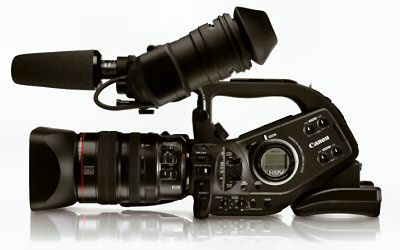
Read all about it here: http://www.dvinfo.net/canonxlh1/watchdog.php
DV Magazine & DV Info Net
Sunday, May 21, 2006
A website for any video editing question imaginable
Wonderful website with great, helpful people.
Found a great fun site
www.textism.com is Dean Allen's main site. He and his wife and child/children live in the south of France (I might not get these facts completely straight) and I think he is a Scotsman originally. Since he bought this dog, Oliver, he has put one picture per day of Oliver, and now Oliver's brother (same parents, different litter) Hugo on this website.
One of the best parts of the picture per day are the comments. They are seldom, "beautiful picture","cute dog!", but are instead "Dog thoughts" and Oliver's response to the photographer.
Very clever, great website, you must see it!
Saturday, May 13, 2006
Video Phones now shipping with video editing software!
Here is the press release, sorry I can't rewrite but I've been working on www.edithomevideo.com all night and I am computer'ed and writing'ed out. Oh, I will check one thing ... googling...googling...googling...googling...okay back ... yikes! Nokia N93 $1200 on Ebay ... http://cgi.ebay.com/ws/eBayISAPI.dll?ViewItem&item=9722352867&category=64355
Nokia Introduces the Next Story in Video with the Nokia N93
April 25, 2006
Digital camcorder and multimedia computer in one easy-to-use compact package
Berlin, Germany and Hong Kong, China - Nokia today introduced the Nokia N93, the ultimate mobile device for spontaneous video recording. Offering uncompromised digital camcorder, telephony and rich Internet communication functionalities, the Nokia N93 features a 3.2 megapixel camera with Carl Zeiss optics, DVD-like video capture and 3x optical zoom. You can connect the Nokia N93 directly to your TV for a widescreen movie experience or upload your images and video to online albums or blogs. Moreover, you can create high-quality home movies and burn them to DVD with the included Adobe Premiere Elements 2.0 software.
"The Nokia N93 marks a new era in the digital camcorder market," said Anssi Vanjoki, executive vice president and general manager of Multimedia, Nokia. "Incorporating all the features you need for great quality movie-making, the Nokia N93 is a fantastic example of a multimedia computer with true digital camcorder performance at its core. Thanks to its connectivity, it allows you to immediately share the memories you've captured, taking the entire camcorder experience to the Internet age."
Intuitive and Spontaneous Capture
Offering the best mobile video and photography experience, the Nokia N93 is packed with exceptional camera features that enable high-quality photos and DVD-like quality video. Unfold and twist the main display, and the Nokia N93 is ready to shoot video and photos using the color landscape display as a full screen viewfinder. Whether special events or just fun, impromptu everyday life, you can capture moments conveniently and impulsively and share them with others as they happen.
Featuring MPEG-4 VGA video capture at 30 frames per second, the Nokia N93 delivers an unparalleled video experience with stereo audio recording and digital stabilization, enabling smooth and shake-free movies. The Nokia N93 incorporates a 3.2 megapixel (2048 x 1536 pixels) camera with a Carl Zeiss Vario-Tessar lens, 3x optical zoom and up to 20x digital zoom, as well as autofocus and close-up mode for amazing clarity and accuracy. Furthermore, the Nokia N93 has an active camera toolbar which displays all available capture features, from exposure value to color tones and white balance. There are dedicated keys for shutter, zoom and flash and also a camera mode key that enables you to switch quickly and easily between image and video capture.
The Nokia N93 features large internal memory of up to 50 MB, which can be further expanded with a hot swap miniSD card of up to 2 GB, allowing users to capture up to 90 minutes of DVD-like quality video or close to 2500 high-quality photos. Furthermore, you can easily transfer your photos and video from the memory card to a compatible PC for storage, and yet always carry a collection of your favorite resized images on the Nokia N93.
Joy of Sharing
Sharing your photos and video clips captured with the Nokia N93 is a snap. Show off your content on the up to 262,144 color 2.4" QVGA display (240 x 320 pixels) featuring a super-wide 160 degree viewing angle. Share your uncompressed photos and video clips instantly via email, Bluetooth technology or by uploading them directly from the Gallery to compatible blogs. You can even share your captured memories with family and friends on a large compatible TV screen, using either the included TV cable or wirelessly over integrated WLAN and UPnP (Universal Plug and Play) technology. Furthermore, from browsing the web to reading your emails and office documents, you can even play games on the Nokia N93 using the screen of your compatible TV.
Creativity Made Easy
While editing your photos and video clips directly on the Nokia N93 is simple, you can also easily transfer them to your compatible PC, allowing for more creative control over your video output. The standard Nokia N93 sales pack comes bundled with Adobe Premiere Elements 2.0, which makes it easy to import video clips, photos and music and to start experimenting with hundreds of transitions and effects, as well as create professional looking home videos with customizable templates. And to top it off, you can effortlessly burn those great home movies to DVD and export formats for Web streaming and email.
Multifunctional Mobile Computing and Connectivity
Part of the Nokia Nseries multimedia computer range, the Nokia N93 offers great functionality in one beautifully shaped connected device. Designed to work on WLAN, 3G (WCDMA 2100 MHz), EDGE and GSM (900/1800/1900 MHz) networks, the Nokia N93 provides broadband Internet access for browsing, uploading content, and sending and receiving emails, allowing you to stay connected on the move. You can also set the device on a surface, flip the display horizontally and use the landscape screen to browse the Web, watch TV* over 3G networks, or make hands-free video calls*.
All Round Entertainment
The Nokia N93 includes a stereo FM radio and a digital music player that offer a fantastic music experience. You can create playlists and enjoy your music hands-free via the speaker or use the stereo headset provided. With the Nokia Music Manager, you can also easily rip your CDs and transfer your music collection to your phone. In addition, you can store up to 1500 songs on your Nokia N93 with a separately available 2 GB miniSD card. You can also enjoy high-quality 3D games with the pre-installed N-Gage franchise System Rush: Evolution.
The Nokia N93, which is based on S60 3rd Edition software on Symbian OS, is expected to become commercially available in July 2006 with an estimated, unsubsidized sales price of approximately 550 euros.
*To check the availability and cost of the service, contact your network operator or service provider.
About Nokia Nseries
Nokia Nseries is a range of high performance multimedia devices that delivers unparalleled mobile multimedia experiences by combining the latest technologies with stylish design and ease of use. With Nokia Nseries products, consumers can use a single device to enjoy entertainment, access information and to capture and share pictures and videos, whenever and wherever they want.
About Nokia
Nokia is a world leader in mobile communications, driving the growth and sustainability of the broader mobility industry. Nokia connects people to each other and the information that matters to them with easy-to-use and innovative products like mobile phones, devices and solutions for imaging, games, media and businesses. Nokia provides equipment, solutions and services for network operators and corporations.
Media Enquiries:
Nokia, Multimedia
Communications
Tel. +358 7180 38194
Nokia
Communications
Tel. +358 7180 34900
Email: press.office@nokia.com
http://www.nokia.com/
http://www.nseries.com/
Please visit the Open Studio 2006 website for more information at: www.nokia.com/press/openstudio
Related photos in print quality can be found at: www.nokia.com/press >photos
Photos from the event can be found at: www.nokia.com/press >photos >events
For broadcast quality video material, please go to: www.nokia.com/press/broadcastroom to preview and request a video.
An event podcast is available at www.nokia.com/podcast/open_studio.mp3
Tuesday, April 25, 2006
Edit Home Video online
Monday, April 24, 2006
Edit Home Video almost ready!
Teaching people about the art of creating the story visually to compliment and not overwhelm the writing is really satisfying. I've created a website, www.edithomevideo.com , because this is the part of my television career I enjoy the most, sharing what I've learned. I've had the priviledge of working with great professionals over the years and the tips and tricks they shared with me, I'm glad to finally get to pass along.
With video editing software prices way, way down and the ease of use way up, it's a chance for me to help church members who want to edit a fundraising video for their church, guide the technical director of a nonprofit to the best places on the web for multimedia help and show people how to create that one of kind video for their parents anniversary.
The website is new, I will update and change it until it's easy to use and full of the latest video news and information.
So thanks for visiting and please post questions and comments!
Thursday, December 08, 2005
What to do with all that footage?
But where do you start? Ten years ago this discussion wouldn't have been possible. A professional video editing system for just one type of format...VHS, DVC Pro, Beta or 3/4 inch would have been at a minimum $25,000. Today, my editing system is Adobe's Premier Pro, in the third bedroom of my house on a PC with a lot of Ram and hard drive space but low on cost. Most media computers, or PCs with enough space can accommodate current editing systems like Adobe Premier Elements which is a popular, simple editing system for the novice or the professional. But the system isn't the important part, it's the process of editing. And that's what this blog is all about, tips, tricks and an easy to understand explanation of how to turn those hours of vacation footage into a snappy music video that will impress your friends and family!